
How to Check IPO Allotment Status Online (KFintech, Bigshare, MUFG Intime)
Applied for an IPO and want to know if you got allotted shares? You can check your status online in minutes using your PAN, Application Number, or Demat Account on the official registrar portals. This guide covers all three major registrars — KFintech, Bigshare Services, and MUFG Intime India.
Table of Contents
- Official IPO Registrar Portals
- KFintech — Step-by-Step Guide
- Bigshare Services — Step-by-Step Guide
- MUFG Intime India — Step-by-Step Guide
- Check via BSE India Website
- Which Lookup Method Should You Use?
- Frequently Asked Questions
1. Official IPO Registrar Portals in India
Every IPO appoints a SEBI-registered Registrar and Transfer Agent (RTA) to manage share allotment. You must use the registrar assigned to your specific IPO. The three major registrars covering most Indian IPOs are listed below.
How do I find my IPO’s registrar? Check the IPO’s Red Herring Prospectus (RHP), your broker app (Zerodha, Groww, Angel One, etc.), or look up the IPO on the BSE or NSE website. The registrar name is always disclosed there.
| Registrar | Official Portal URL | Notable IPOs Handled |
|---|---|---|
| KFintech (KFin Technologies) | ipostatus.kfintech.com | LIC and many other mainboard IPOs |
| Bigshare Services | ipo.bigshareonline.com | Many SME and mainboard IPOs |
| MUFG Intime India (formerly Link Intime) | in.mpms.mufg.com | Zomato, Nykaa, Paytm, PolicyBazaar, Delhivery |
2. How to Check IPO Allotment Status on KFintech
KFintech (formerly Karvy Fintech) is one of India’s largest RTAs and handles allotment for a large number of mainboard IPOs. Follow these steps:
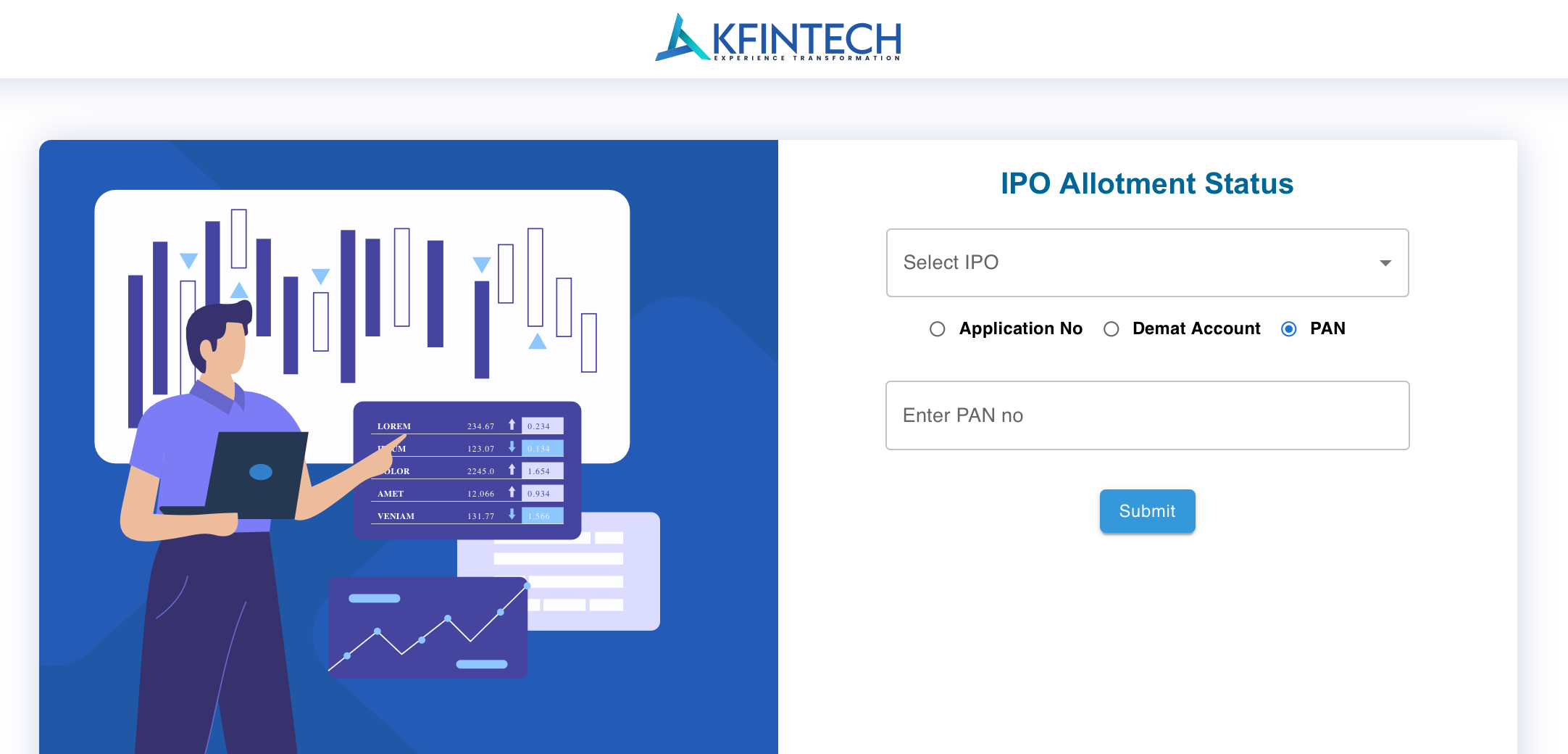
- Go to the KFintech IPO Portal
Open ipostatus.kfintech.com in your browser. No login or registration is required. - Select the IPO from the Dropdown
Click on Select IPO and choose the company name from the list. Only IPOs whose allotment results have been declared will appear here. - Choose Your Lookup Method
Select one of three options:- Application No.
- Demat Account (DP ID + Client ID)
- PAN Number
- Enter Your Details
If using PAN, type your 10-character PAN (example: ABCDE1234F) in the input field. PAN is the easiest and most recommended method. - Submit and View Result
Click Submit. The page will display your allotment result — including shares applied for, shares allotted, and refund amount if applicable.
3. How to Check IPO Allotment Status on Bigshare Services
Bigshare Services Pvt. Ltd. is a SEBI-registered RTA based in Mumbai. Their portal supports seven Indian languages and serves many SME and mainboard IPOs.
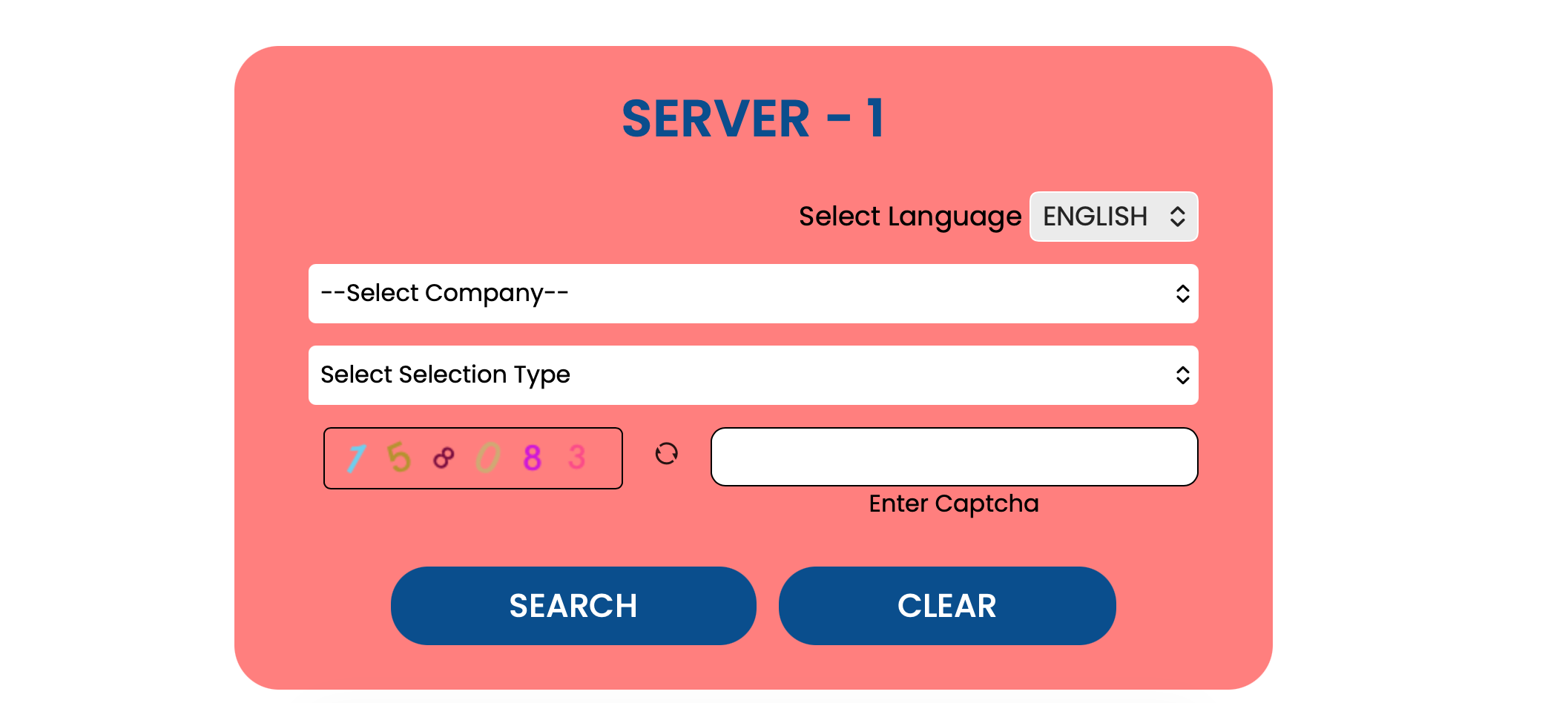
- Open the Bigshare IPO Status Portal
Visit ipo.bigshareonline.com/IPO_Status.html. This is the Server 1 link. - Select Your Language (Optional)
The portal is available in: English, Hindi, Marathi, Gujarati, Telugu, Tamil, and Bengali. Choose your preferred language from the top menu. - Select the Company
Use the Select Company dropdown to pick the IPO you applied for. - Select Your Search Type
Choose from:- Application No. / CAF No.
- Beneficiary ID (Demat account number)
- PAN Number
- Enter Captcha and Click Search
Type the captcha shown on screen, then click SEARCH. Click CLEAR to reset the form if needed. Your allotment status will appear below the form.
4. How to Check IPO Allotment Status on MUFG Intime India
MUFG Intime India (formerly Link Intime India Pvt. Ltd.) was rebranded after acquisition by MUFG. It remains a major registrar for large Indian IPOs and offers the widest range of lookup options including bank account-based search.
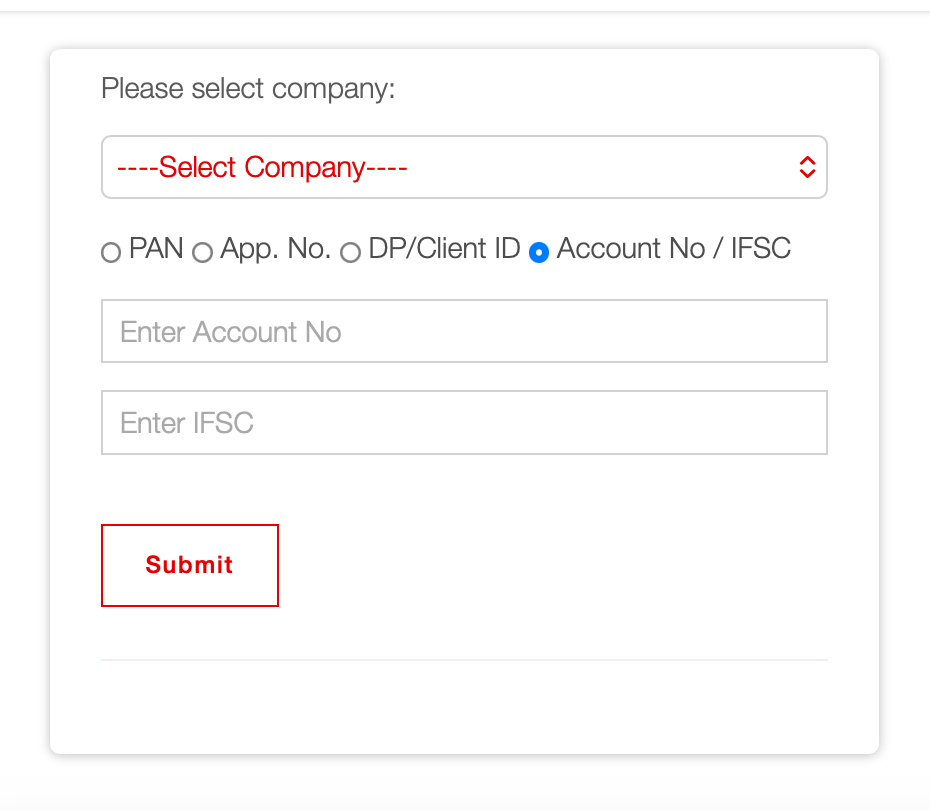
- Visit the MUFG Intime IPO Page
Open in.mpms.mufg.com/Initial_Offer/public-issues.html. - Select the IPO Company
Use the first dropdown (Select Company) to choose the IPO you applied for. - Choose Your Lookup Method
MUFG Intime offers four lookup options:- PAN — recommended, fastest option
- Application No. — from your broker or ASBA acknowledgement slip
- DP / Client ID — your 16-digit demat account number
- Account No. / IFSC — your bank account used for the ASBA application
- Enter Your Details and Submit
Fill in the required field for your chosen method and click SUBMIT. Your allotment result will be displayed on screen.
5. Check IPO Allotment Status via BSE India
BSE (Bombay Stock Exchange) provides a centralised allotment status checker that works for all IPOs listed on BSE — regardless of which registrar was appointed. This is a reliable fallback if you are unsure about the registrar.
- Go to the BSE Investor Services Page
Visit bseindia.com and navigate to Investors > Application Status. - Enter Your PAN and Application Number
BSE requires both your PAN and application number. Your application number is available in your broker app under IPO order history or on your ASBA acknowledgement slip. - View Your Allotment Status
BSE will display your application details, bid amount, and whether shares were allotted or not.
6. Which Lookup Method Should You Use?
All major registrar portals support multiple ways to search. Here is a comparison to help you choose the right one:
| Lookup Method | What You Need | Available On | Recommended? |
|---|---|---|---|
| PAN Number | Your 10-character PAN card number | KFintech, Bigshare, MUFG Intime, BSE | Best — use this first |
| Application Number | Reference number from your broker or ASBA slip | All registrars | Good alternative |
| Demat / DP Client ID | 16-digit demat account number | KFintech, Bigshare, MUFG Intime | Good alternative |
| Bank Account + IFSC | Bank account used for ASBA application | MUFG Intime only | Use if other methods fail |
Tip: PAN-based lookup is the fastest method. You do not need to locate your application number or demat details. Just enter your 10-character PAN and you get the result instantly.
7. Frequently Asked Questions
Yes. All three major registrar portals — KFintech, Bigshare, and MUFG Intime — allow you to check allotment status using only your PAN number. You do not need your application number or demat account details.
It depends on the registrar assigned to the IPO. The three main portals are: ipostatus.kfintech.com (KFintech), ipo.bigshareonline.com/IPO_Status.html (Bigshare Services), and in.mpms.mufg.com (MUFG Intime). If you are unsure which registrar your IPO uses, you can also check via BSE India at bseindia.com, which covers all BSE-listed IPOs.
Yes, provided you are on the official website. KFintech and Bigshare are SEBI-registered Registrar and Transfer Agents. The official URLs are ipostatus.kfintech.com and ipo.bigshareonline.com. Always verify the URL before entering any personal information. Avoid using third-party or unofficial sites that claim to show allotment status.
Yes. MUFG Intime India is the rebranded name of Link Intime India Pvt. Ltd., following its acquisition by MUFG (Mitsubishi UFJ Financial Group). The registrar continues to handle the same IPOs under the new brand. The official portal is now at in.mpms.mufg.com.
Quick Links — Check Your IPO Allotment Status Now
- KFintech IPO Allotment Status — ipostatus.kfintech.com
- Bigshare IPO Allotment Status — ipo.bigshareonline.com
- MUFG Intime IPO Allotment Status — in.mpms.mufg.com
- BSE India — IPO Application Status
Disclaimer: This article is for general informational purposes only and does not constitute investment, financial, or legal advice. IPO allotment is determined solely by SEBI-registered Registrars and Transfer Agents (RTAs) and stock exchanges — this website is not affiliated with, endorsed by, or connected to KFintech, Bigshare Services, MUFG Intime India, BSE, or NSE in any way. Portal URLs, steps, and screenshots shown here reflect the sites as of the last update date and may change without notice; always verify you are on the correct official domain before entering personal information such as your PAN, demat, or bank details. Investments in securities, including IPOs, are subject to market risks; past subscription or listing performance does not guarantee future results. Please read the official Red Herring Prospectus (RHP) and consult a SEBI-registered financial advisor before making any investment decision. While efforts have been made to ensure accuracy, we do not guarantee that the information is complete, current, or error-free, and we accept no liability for any loss arising from reliance on this content.